
If you just got a kids waterproof LED watch and want a short, clear setup guide, this article is for you. I will show you exactly how to set the time and date using the real button steps, so you can start using the watch right away.
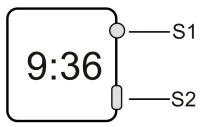
Basic Functions and Modes
This kids waterproof LED watch shows year, month, day, hour, minutes, seconds, and supports 12/24H format. In normal mode it will be in standby mode, and the watch will display nothing to save power.
Mode convert in normal mode follows the exact manual:
- In normal mode, press S1 to convert the mode as following: Normal mode → Date display mode → Seconds display mode → Normal mode.
These simple modes make it easy to use this kids waterproof digital watch in daily life, especially for children who only need one main button to check the time and date.
How to Set Time and Date?
Use the following button order to set your kids waterproof LED watch.
- In normal mode, hold S2 for 2 seconds to enter time and date mode, and “Hour” will start flashing; press S1 to adjust Hour.
- Press S2 again, then “Minutes” will be flashing; press S1 to adjust Minutes.
- Press S2 again, then “Month” will be flashing; press S1 to adjust Month.
- Press S2 again, then “Date” will be flashing; press S1 to adjust Date.
- Press S2 again, then “Year” will be flashing; press S1 to adjust Year.
- Press S2 again to enter into 12/24H mode; press S1 to adjust the mode between 12-hour and 24-hour display.
After you set all the data, press S2 to exit. If there is no operation for about 5 seconds, the watch will automatically go back to standby mode and save your settings. This clear order makes it very easy to match each step with a screen interface image.
Daily Use Tips for Kids and Parents
For a kids waterproof LED watch, simple habits help children and parents avoid confusion and get stable daily use.
- When the screen is blank, press S1 once to check the time, then let it return to standby automatically to save power.
- If the time or date is changed by accident, repeat the setting steps above in the same order (Hour → Minutes → Month → Date → Year → 12/24H) to correct it.
- Many kids LED sport watch and children waterproof sport watch models follow the same “hold S2 to set, press S1 to adjust” pattern, so learning this watch makes other kids digital models easier to use as well.
About ITSKMEI as Distributor
Our ITSKMEI team focuses on supplying genuine SKMEI watches for both daily buyers and business customers. We know the key functions, specs, and packaging requirements for models like SKMEI 1176B, and we support small retail orders as well as larger purchase projects with stable service and delivery.
Conclusion
A kids waterproof LED watch is easy to manage once you follow the button order for time, date, and 12/24H settings described above. If you want to buy this type of children digital sport watch or need a quote for bulk orders, you can contact ITSKMEI to get pricing, stock details, and more support before you decide to purchase.