
The SKMEI 1761 watch user manual provides the essential steps needed to operate your dual-time timepiece effectively. Whether you are tracking a second time zone or using the high-accuracy chronograph, understanding its interface is key to maximizing its potential. This guide serves as the complete manual to help you master every feature.
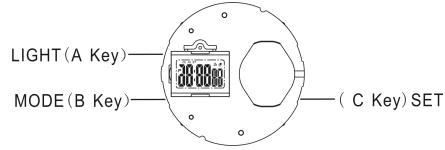
A. Features
- 6 Digits LCD Display, Display Hour, Minute, Second, Month, Day and week.
- Daily Alarm and Chime hourly.
- 12 / 24H format selectable, Auto Calendar.
- 1/100 second Chronograph.
- Dual time.
- LED backlight.
B. Operational Manual

At any state, press A key LED backlight for 3s.
Mode Settings and Adjustments
Real Time Mode
- Press and hold C key for 2s to time setting mode. “Second” flashing, press B key to zero; Press C to select item as following sequence: Hour → Minute → 12H/24H. Press B key to adjust the flashing.
- Press B key while the seconds are in the range of 30 to 59 resets them to 00 and adds 1 to the minutes. In the range of 00 to 29, the minutes are unchanged.
- If there is no key operation for 60s, Setting Mode will be exit and returned to Real Time Display Mode.
Date Mode
- Press and hold C key for 2s to date setting mode. “Month” flashing. Press C key to select item as following sequence: “Month”, “Day”, “Week”. Press B key to adjust the flashing.
- If there is no key operation for 60 second, Setting Mode will be exit and returned to Date Display Mode.
Daily Alarm Mode
- Press and hold C key for 2s to alarm setting mode, “Hour” flashing. Press C key to select item as following sequence: “Minute ( hour digit )”, “Minute ( Minute digit )”, “ALARM/CHIME” switch.
- Press B key to adjust the flashing.
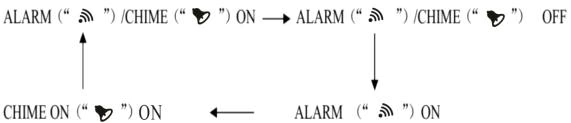
- When switching “ALRM/CHIME”, press B key by sequence as follows: ALARM / CHIME ON → ALARM / CHIME OFF → ALARM ON → CHIME ON
- There will be 20s alert when alarm time is over.
- If there is no key operation for 60s, Setting Mode will be exit and returned to Alarm Display Mode.
Dual Time Mode
- Press and hold C key for 2s to dual time setting mode, “Hour” flashing, Press C key to select item as following sequence: “Minute”, “12H/24H”.
- Press B key to adjust the flashing.
- If there is no key operation for 60s, Setting Mode will be exit and returned to Dual Time Display Mode.
Chronograph Mode
- Press C key to Start/Stop running;
- When stop, press C key for 2s zero.
Official SKMEI Distribution
ITSKMEI is the official SKMEI watches distributor, ensuring that every timepiece is 100% authentic and backed by professional support. When you source through an authorized channel, you guarantee the quality and longevity of your investment.
H2: Conclusion
The SKMEI 1761 offers a robust set of features for the modern user. For bulk orders or specific technical inquiries, please contact ITSKMEI today. Visit our website to browse our full collection and request a quote for your next purchase.