
The SKMEI 1798 manual is essential for anyone looking to master this rugged, multifunctional digital timepiece. Known for its distinct octagonal design and practical features, the watch requires specific button sequences to calibrate. Whether you need to synchronize the seconds or set a dual-time zone, this guide provides a professional walkthrough to get your watch perfectly configured.
Understanding the SKMEI 1798 Interface
Before diving into the settings, familiarize yourself with the two-button layout:
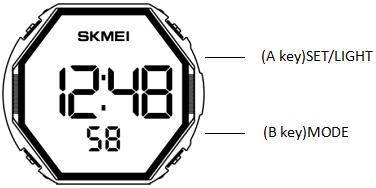
- (A Key) SET/LIGHT: Used to enter setting modes, switch between setting elements, and activate the EL backlight.
- (B Key) MODE: Used to cycle through different functional modes and adjust numerical values during settings.
Step-by-Step Operation Guide

1. Setting the Normal Time
- Ensure you are in Normal Time Mode.
- Press and hold the A key for two seconds. The “seconds” will begin flashing.
- Press the B key to reset seconds to zero (if seconds are $>30$, one minute is added).
- Press the A key to cycle through: Hour → Minutes → 12/24-hour system.
- While an element is flashing, press the B key to adjust it.
- The watch will automatically save and exit if no key is pressed for 60 seconds.
2. Date and Calendar Adjustment
- From Normal Time, press the B key once to enter Date Mode.
- Press and hold the A key for two seconds until the “month” flashes.
- Press the A key to switch between Month → Date → Week.
- Use the B key to adjust the flashing value.
3. Managing Alarms and Hourly Chime
- Press the B key twice to enter Alarm Mode.
- Press and hold the A key for two seconds to enter settings.
- Use the A key to select Hour → Minutes (tens) → Minutes (units) → ALARM/CHIME on-off.
- In the “ALARM/CHIME” toggle, use the B key to cycle through:
- ALM/SIG ON
- ALM/SIG OFF
- ALM ON
- SIG ON (Hourly Chime)

4. Dual Time and Stopwatch
- Dual Time: Press the B key three times to reach Dual Time Mode. Hold the A key to adjust the hour/minute for a second time zone.
- Stopwatch: Press the B key four times. Press A to start/stop. To reset, hold the A key for two seconds while the timer is stopped.
About ITSKMEI
As a premier authorized SKMEI timepieces distributor, ITSKMEI specializes in providing authentic, high-quality digital and quartz watches to global markets. We pride ourselves on offering professional technical support, comprehensive manuals, and a vast inventory of the latest SKMEI models for both retail and wholesale partners.
Conclusion
By following this SKMEI 1798 manual, you can ensure your watch remains a reliable tool for your daily schedule. Mastering the interface allows you to leverage every feature from the stopwatch to the dual-time display. For more technical support or to browse our latest collection, please visit our shop or contact ITSKMEI for a professional wholesale inquiry.