
Welcome to the definitive manual for configuring your new timepiece. Whether you are adjusting the time, calibrating the compass, or tracking your daily steps, mastering your watch is easy with the right guidance. If you are looking for clear SKMEI 1802 watch instructions, you have come to the right place. Read on to discover the step-by-step process for getting the most out of your device.
Step-by-Step Watch Setup
Watch Button Layout and Key Features
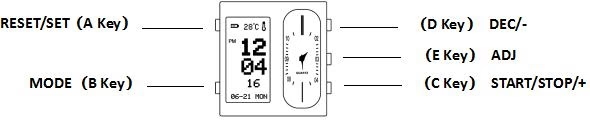
Before diving into the settings, it is essential to understand the button layout:
- A Key: RESET/SET
- B Key: MODE
- C Key: START/STOP/+
- D Key: DEC/-
- E Key: ADJ
Core Features: The watch features a TFT display showing the hour, minute, second, week, date, month, day, and temperature. It includes a 12/24H format, pedometer, 7-day step memory, compass, three alarms, and a stopwatch. Pressing any key activates the screen for 10 seconds.
Synchronous Needle Function: In normal time mode, press the E key 3 times to access the needle function. Hold the E key to move the minute hand quickly.
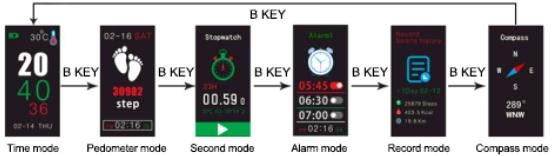
Product Mode Guidance: Press the B key to cycle through the modes in this order: Time Mode ➔ Pedometer Mode ➔ Second Mode (Stopwatch) ➔ Alarm Mode ➔ Record Mode ➔ Compass Mode.
Time Mode Function
Time Setting Steps:
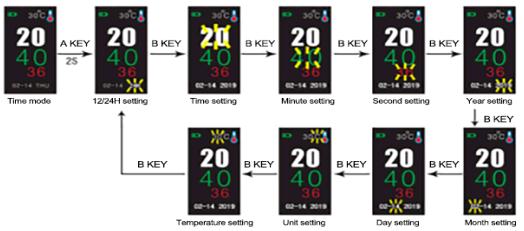
- In Time Mode, hold down the A Key for 2 seconds to enter the setting state.
- Press the B Key to switch between the setting items: 12/24H ➔ Time ➔ Minute ➔ Second ➔ Year ➔ Month ➔ Day ➔ Temperature Unit.
- Press the C Key to decrease the selected value, or the D Key to increase it. You can hold the C/D keys for quick adjustment.
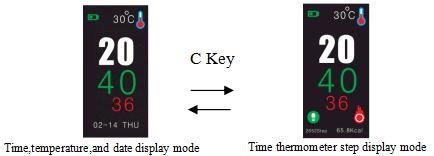
- To switch between Time/Temperature/Date display and Time/Thermometer/Step display, simply press the C Key while in standard Time Mode.
Step Counting Mode Setting
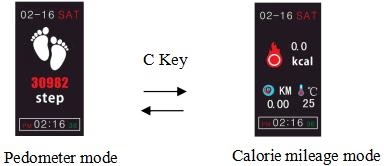
Pedometer Mode Setting: Hold down the D Key for 3 seconds to turn the pedometer function on or off. Press the C Key to toggle between standard Pedometer mode and Calorie/Mileage mode.
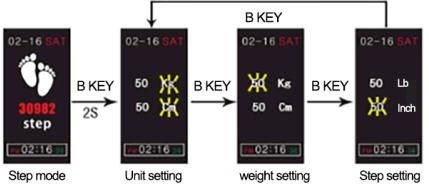
Personal Data Configuration:
- Hold down the A Key for 2 seconds to enter the setting state.
- Press the B Key to cycle through: Unit setting ➔ Weight setting ➔ Step distance setting.
- Press the C Key to decrease and the D Key to increase the values. Note: You can select metric or imperial systems. The weight range is 20~200 Kg (44~441 Lb), and the step distance range is 30~180 cm (12~71 Inch).
Stopwatch Mode and Alarm Clock
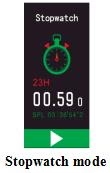
Stopwatch Mode:
- Press the C Key to start or pause the stopwatch.
- Press the A Key to pause and reset it to zero. Note: The stopwatch can run up to 23 hours, 59 minutes, and 59.99 seconds. It will continue running in the background if you exit the mode.
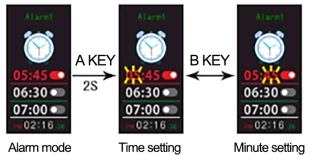
Alarm Clock Configuration:
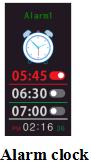
- Press the C Key to select from three available alarms: Alarm 1, Alarm 2, or Alarm 3.
- Press the D Key to turn the selected alarm on or off.
- Hold the A Key for 2 seconds to enter the setting state.
- Press the B Key to switch between Hour and Minute settings.
- Use the C/D Keys to adjust the values. The alarm will sound for 10 seconds when triggered; press any key to interrupt it.
Memory and Compass Modes
[📍 INSERT IMAGE 5 HERE: H. Pedometer memory mode & I. Compass mode (First Part)]
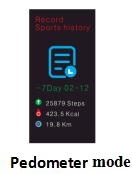
Pedometer Memory Mode: Press the C Key to view your 7-day historical step data. Press the D Key to view the specific calories and mileage for a chosen day. Data older than 7 days is automatically deleted.
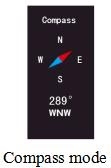
Compass Mode and Calibration:
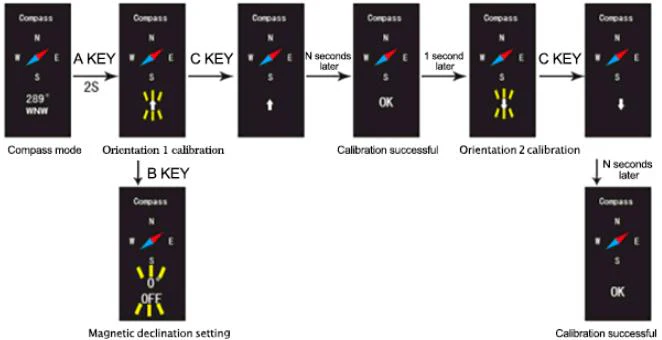
- Hold the A Key for 2 seconds to enter the compass setting state.
- Press the B Key to switch between Orientation calibration and Magnetic declination setting.
- For Orientation calibration, press the C Key to start. After the first calibration succeeds, wait 1 second, turn the watch slightly, and press the C Key again for the second calibration until “OK” is displayed.
- For Magnetic declination, use the C/D keys to adjust West (W) or East (E) between 1°~90°, or set it to OFF. Setting status will automatically save and exit if there is no operation within 1 minute.
About ITSKMEI: Your Trusted SKMEI Distributor
If you are looking to source high-quality timepieces in bulk, ITSKMEI is your premier destination. As an authorized SKMEI watch distributor, we provide a vast catalog of durable, stylish, and feature-rich digital and analog watches suitable for any market. We pride ourselves on offering competitive wholesale pricing, reliable global shipping, and exceptional customer service. Partnering with ITSKMEI ensures your business is stocked with genuine, top-tier products backed by industry expertise.
Conclusion
We hope these SKMEI 1802 watch instructions have helped you successfully set up and understand your new device. From tracking your daily steps to finding your way with the built-in compass, this watch is built to support your active lifestyle. If you are a retailer interested in stocking this model or exploring our full range of products, please contact us today. Visit the ITSKMEI website to shop our collections and request a customized wholesale quote!