
Welcome to your comprehensive guide on mastering your new timepiece! Whether you have just purchased your watch or simply lost your original manual, these SKMEI 1828 watch instructions will help you unlock all the powerful features of this digital watch. The SKMEI 1828 boasts a 12-digit LCD display, daily alarms, an hourly chime, a 1/100 second chronograph, a timer, dual time capability, and an EL backlight. Read on for a step-by-step breakdown of how to operate every function perfectly.
Button Layout and Operational Modes
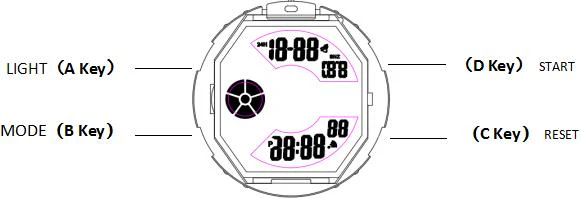
SKMEI 1828 Watch Button Layout
Before diving into the specific settings, it is essential to understand the button layout of your watch.
- A Key (Top Left): LIGHT
- B Key (Bottom Left): MODE
- C Key (Bottom Right): RESET
- D Key (Top Right): START
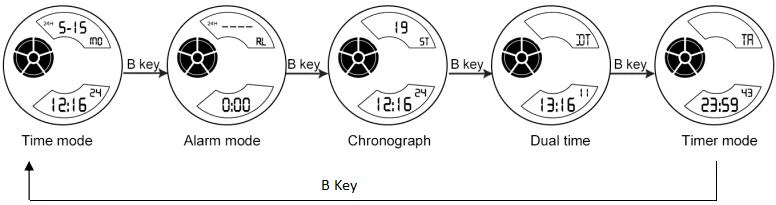
By pressing the B Key, you can cycle through the different operational modes in the following sequence: Normal Time Mode ➔ Alarm Mode ➔ Chronograph ➔ Dual Time ➔ Timer Mode. Remember, you can press the A Key at any state to turn on the EL backlight for 2 seconds.
SKMEI 1828 Watch Setting
Normal Time Mode Setting
To set the correct local time and date on your SKMEI 1828, follow these straightforward steps:
- In Normal Time Mode, press and hold the C Key for 2 seconds to enter the time setting state. The “Second” digits will begin flashing. Press the D Key to reset the seconds to zero.
- Press the B Key to select the item you want to adjust. The sequence will cycle through the settings.
- Press the D Key to adjust the currently flashing item.
- Once you have finished adjusting your time and date, press the C Key to return to the Normal Time Mode.
- Tip: To switch between 12-hour (12H) and 24-hour (24H) formats, simply press the D Key while in the main timekeeping mode.
Daily Alarm Setting
Never miss an important event with the daily alarm and chime functions.
- Turning Alarms On/Off: In Alarm mode, press the C Key to toggle the alarm and snooze (SNZ) functions on or off. Press the D Key once to enter the hourly timekeeping screen, and press the C Key to turn the hourly chime on or off.
- Setting the Alarm Time: In Alarm Mode, hold the C Key until the alarm “Hours” begin flashing. Press the B Key to navigate between Hour, Minute, Month, and Date. Use the D Key to adjust the data. Press the C Key to exit.
- Note: If you set a specific Month and Date, the alarm will only sound on that exact day. If left blank, it will act as a daily alarm.
Chronograph Mode
Perfect for sports and timing events, the 1/100 second chronograph features a split-count function.
- Press the D Key to Start or Stop the running stopwatch.
- When stopped, press the C Key to reset the timer to zero.
- While running, press the C Key to initiate “Split Counting” (taking a lap time). Press the D Key to exit the split count and stop counting altogether, then press the C Key to zero it out.
Dual Time Mode
If you travel frequently or work with international clients, the Dual Time feature is incredibly useful.
- From the Normal Time Mode, press the B Key three times to enter Dual Time Mode.
- Press and hold the C Key for 2 seconds to enter the “Hour” setting. Press the B Key to switch to the “Minute” setting.
- Press the D Key to adjust the flashing item to your desired secondary time zone.
- Press the C Key again to finish setting and return to the Dual Time display.
Timer Mode
The countdown timer can be set for up to 23 hours, 59 minutes, and 59 seconds.
- Press and hold the C Key for 2 seconds until the “Hour” digits flash.
- Press the B Key to toggle between selecting the “Hour” or “Minute” settings.
- Press the D Key to adjust the flashing value, and then press the C Key to complete your setup.
- To operate the timer, press the D Key to start or stop the countdown. Press the C Key to return to your starting value when the counting is stopped.
Your Trusted Wholesale Partner: About ITSKMEI
If you are looking to stock up on high-quality digital watches like the 1828 model, look no further than ITSKMEI. As a premier distributor of SKMEI watches, ITSKMEI is dedicated to providing businesses, retailers, and watch enthusiasts with authentic products directly from the manufacturer. We pride ourselves on offering an extensive catalog of robust, stylish, and functional SKMEI timepieces alongside exceptional customer service and highly competitive wholesale pricing. Partnering with ITSKMEI ensures that you are getting reliable inventory backed by industry expertise.
Conclusion
We hope these SKMEI 1828 watch instructions have helped you set up your timepiece with confidence. From configuring your daily alarms to utilizing the dual time and chronograph features, your watch is now ready for any adventure. If you are interested in purchasing this model for yourself, or if you are a retailer looking to buy in bulk, we invite you to shop with us. Contact ITSKMEI team today for exclusive pricing inquiries, wholesale catalogs, and top-tier support.