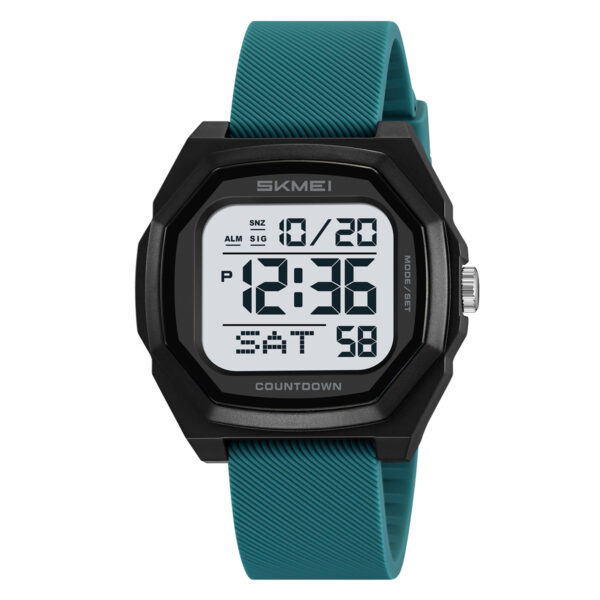
This comprehensive guide provides everything you need to know about the SKMEI 1733 watch instruction manual. Whether you are setting the time for the first time or exploring advanced features like the countdown timer and dual time, follow these steps for a seamless experience.
A. SKMEI 1733 Features
- 15 Digits LCD Display: Shows Hour, Minute, Second, Month, Day, Year, and Week.
- Daily Alarm and Hourly Chime.
- Snooze function for added convenience.
- Selectable 12/24H format and Auto Calendar.
- 1/100 second Chronograph with split functions.
- Countdown Timer and Dual Time capabilities.
- EL backlight for low-light visibility.
B. Operational Manual
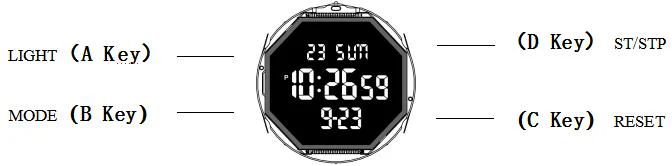
To navigate through the different modes of your SKMEI 1733, use the B Key to cycle through: Normal Time → Alarm → Chronograph → Dual Time → Countdown.

Normal Time Mode
Time Setting

- Press and hold the C key for 2 seconds to enter the time setting state. The “Seconds” will begin flashing. Press the D key to reset seconds to zero. Press the B key to select items in the following sequence: Second → Hour → Minute → Year → Month → Day.
- Press the D key to adjust the flashing item to your desired value.
- Press the C key to save and return to Normal Time Mode.
- Note: Pressing the D key while seconds are between 30–59 resets them to 00 and adds 1 minute. Between 00–29, the minutes remain unchanged.
- 12/24-Hour format: In Normal Time Mode, press the D key to toggle between 12H and 24H timekeeping.
- Press the C key to withdraw from the setting state.
Daily Alarm Mode
- In Alarm Mode, press the C key to cycle through turning the Alarm and Snooze function (ALM/SNZ) ON or OFF.
- Press the D key to enter the hourly timekeeping screen. Press the C key on this screen to toggle the hourly chime (SIG) ON or OFF.
- When the alarm is active, the symbol will flash at the set time, sounding for 10 seconds.
Alarm Setting Mode
- In Alarm Mode, hold the C key until the Alarm Hours begin flashing to enter the setting state.
- Press the B key to choose: Alarm Hour → Minute → Month → Date. Press the D key to adjust the data.
- If you set a specific Month and Date, the alarm will only sound on that day. If no data is set (displayed as “–“), it means the alarm sounds daily/monthly.
- When active, the alarm symbol displays in all modes.
- Press the C key to exit.
Chronograph Mode
- Press the D key to Start or Stop the stopwatch.
- When stopped, press the C key to reset the timer to zero.
- While running, press the C key to activate Split Counting. Press the D key to exit split count and stop counting; press the C key again to zero.
- While running, you can press the B key to return to Normal Time Mode while the chronograph continues in the background.
Dual Time Mode
Dual Time Setting
- In Dual Time mode, press and hold the C key for 2 seconds to select the “Hour” setting. Press the B key to choose the next item: Hour ↔ Minute.
- Press the D key to adjust the flashing item.
- Press the C key again to finish setting and return to Dual Time display mode.
Countdown Mode
- Press the D key to turn the Countdown ON or OFF.
- When the countdown is stopped, press the C key to reset to the initial start time.
- The countdown stops automatically at zero, and the alarm sounds for 15 seconds. The maximum range is 23 hours, 59 minutes, and 59 seconds.
- Press the D key to restart the timer once it has stopped.
- To set the time: Press and hold the C key for 2 seconds.
- Press the B key to select items: Hour ↔ Minute.
- Press the D key to adjust the selected item.
- Press the C key to confirm and return to display mode.
Official SKMEI Distributor
ITSKMEI is proud to be an official distributor of SKMEI watches. We specialize in providing authentic timepieces that combine durability with modern digital features. By choosing us, you ensure that your SKMEI 1733 watch instruction needs are met with professional support and genuine products.
Conclusion
Mastering the SKMEI 1733 is simple once you understand the button logic. From daily alarms to dual time zones, this watch is built for versatility. If you are looking to purchase the SKMEI 1733 or want to browse our full collection, please visit our shop. For bulk orders or pricing inquiries, contact ITSKMEI today to get the best quote!